POX webservice/JSON issue

While trying to enable the openflow.webservice.py and web.webcore.py modules from pox on RedHat 6.4 Linux… I kept receiving the following error…

[root@sdn-A4 Python-2.7.3]# python -u /opt/pox/pox.py --verbose forwarding.l2_pairs web.webcore openflow.webservice
POX 0.2.0 (carp) / Copyright 2011-2013 James McCauley, et al.
Traceback (most recent call last):
 File "/opt/pox/pox/boot.py", line 91, in do_import2
  __import__(name, level=0)
 File "/opt/pox/pox/openflow/webservice.py", line 50, in <module>
from pox.openflow.of_json import *
 File "/opt/pox/pox/openflow/of_json.py", line 111
 _unfix_map = {k:_unfix_null for k in of.ofp_match_data.keys()}
                                  ^
SyntaxError: invalid syntax
Could not import module: openflow.webservice

It was working fine on my MacOSx with Mavericks, but was getting the above error on Red Hat. After looking at the version of pox on both systems… I saw no difference. The only difference was Red Hat was running Python 2.6.6 and MacOSx was running 2.7.3.

The fix? Upgrade Python, BUT do not replace version 2.6.6 in the system path because YUM depends on it.

Run the following commands…

mkdir /opt/Python-273
cd /opt/Python-273
wget http://www.python.org/ftp/python/2.7.3/Python-2.7.3.tgz
tar -xvzf Python-2.7.3.tgz
yum install gcc
cd Python-2.7.3
./configure
make altinstall
alias python273="/opt/Python-273/Python-2.7.3/python"

Now that python 2.7.3 is installed… just make sure you run POX with the new version alias command.

python273 pox.py

Single Rack SDN Environment

Attached is a PDF of a visio diagram of the single rack layout.

A couple of things about the diagram-

One blade per chassis is on the 10G “control network” – A1 and B1 to be used as controllers\ and C1 as the monitor/SNMP poller.

The blade chassis are connected via 1G to the control network as well (console/ssh access)

Initial configuration will not connect the data networks to the production network

Later testing needs to be done to run load over the OpenFlow VRF

In addition to our current ongoing activity around load testing (both traffic and rules) we need to start work on testing the general use cases.

Use Case #1 – Expressway #1

  • Normal traffic will flow over the A links between switches
  • Traffic from A2 to B2 will be routed over the B link between switch #1 and switch #2

This  will require a fairly simple rule – but it could be based on MAC address, source/dest IP, port, …

I think we should load up traffic on the A link and then show that we can independently load up traffic on the B path.  We should also plan to put rule set updates/stress on the servers as well.

Use Case #2 – Expressway #2A

This is similar to above but traffic has to flow through two switches

  • Traffic from A2 to C2 will flow over the B paths

Use Case #3 – Expressway #2B

This is similar to #1 – but the path is between switch #1 and switch #3 and bypasses switch #2

  • Traffic from A2 to C2 will flow over the C path

Visio-SDN Use Case Mapping – Single Rack – 12-04-13

POX openflow NEC flow test Nov 30th, 2013

POX openflow NEC flow test

Lesson learned:

1. In order for the NEC switch to start see a new controller you must disable openflow on the specified vlan then reenable it after configuring the new openflow controller

Example…

VLAN 213
openflow-id 0 #disables openflow
no openflow controller 1
openflow controller 1 address 10.138.32.3 DATA
openflow-id 1 #enables openflow again on the vlan

2. to see what ports are openflow enabled run the “show openflow 1” command
PortList Status State Config Current Advertised Supported Peer
57 e 0x200 0x2 0x140 0x0 0x0 0x0
58 e 0x200 0x2 0x140 0x0 0x0 0x0
59 e 0x200 0x2 0x140 0x0 0x0 0x0
60 e 0x200 0x2 0x140 0x0 0x0 0x0

Then you can manually add one port.
NEC Tests

Test1 – Layer 2 flows – Add 10 flows per second, max of 1000 flows, statically adding to port 57
Results – The rate didn’t appear to be an issue, but there is a max of 750 flows L2

ERROR:openflow.of_01:[74-99-75-81-b3-00|213 1] OpenFlow Error:
[74-99-75-81-b3-00|213 1] Error: header:
[74-99-75-81-b3-00|213 1] Error: version: 1
[74-99-75-81-b3-00|213 1] Error: type: 1 (OFPT_ERROR)
[74-99-75-81-b3-00|213 1] Error: length: 76
[74-99-75-81-b3-00|213 1] Error: xid: 1005
[74-99-75-81-b3-00|213 1] Error: type: OFPET_FLOW_MOD_FAILED (3)
[74-99-75-81-b3-00|213 1] Error: code: OFPFMFC_ALL_TABLES_FULL (0)
[74-99-75-81-b3-00|213 1] Error: datalen: 64
[74-99-75-81-b3-00|213 1] Error: 0000: 01 0e 00 50 00 00 03 ed 00 3f ff f7 ff ff 00 00 …P…..?……
[74-99-75-81-b3-00|213 1] Error: 0010: 00 00 00 00 01 23 45 36 a0 de 00 00 00 00 00 00 …..#E6……..
[74-99-75-81-b3-00|213 1] Error: 0020: 00 00 00 00 00 00 00 00 00 00 00 00 00 00 00 00 …………….
[74-99-75-81-b3-00|213 1] Error: 0030: 00 00 00 00 00 00 00 00 00 00 00 00 00 00 80 00 …………….

Test2 – Layer 2 flows – Add 10 flows per second, max of 1000 flows, statically adding from range for ports 57 to 60
Results – same as test1 – The rate didn’t appear to be an issue, but there is a max of 750 flows L2

ERROR:openflow.of_01:[74-99-75-81-b3-00|213 1] OpenFlow Error:
[74-99-75-81-b3-00|213 1] Error: header:
[74-99-75-81-b3-00|213 1] Error: version: 1
[74-99-75-81-b3-00|213 1] Error: type: 1 (OFPT_ERROR)
[74-99-75-81-b3-00|213 1] Error: length: 76
[74-99-75-81-b3-00|213 1] Error: xid: 974
[74-99-75-81-b3-00|213 1] Error: type: OFPET_FLOW_MOD_FAILED (3)
[74-99-75-81-b3-00|213 1] Error: code: OFPFMFC_ALL_TABLES_FULL (0)
[74-99-75-81-b3-00|213 1] Error: datalen: 64
[74-99-75-81-b3-00|213 1] Error: 0000: 01 0e 00 50 00 00 03 ce 00 3f ff f7 ff ff 00 00 …P…..?……
[74-99-75-81-b3-00|213 1] Error: 0010: 00 00 00 00 01 23 45 50 21 c7 00 00 00 00 00 00 …..#EP!…….
[74-99-75-81-b3-00|213 1] Error: 0020: 00 00 00 00 00 00 00 00 00 00 00 00 00 00 00 00 …………….
[74-99-75-81-b3-00|213 1] Error: 0030: 00 00 00 00 00 00 00 00 00 00 00 00 00 00 80 00 …………….
Test3 – Layer 2 flows – Add 50 flows per second, max of 749 flows, statically adding from range for ports 57 to 60
Results – The rate didn’t appear to be an issue, this time there were no errors

Apparently the NEC does state that it only supports 750 12 tuple flows, but supports over 80K layer2 flows.

Results Summary – perfSONAR tests – 10/28/13 – 10/31/13

I assembled a table summarizing the results for the non-overlapping tests as I am confused about several of them –


Path 1 Hop Path 2 Hop
SDN01->SDN07 8999.5 SDN01->SDN11 7771.6
SDN02->SDN05 7967.7 SDN02->SDN09 7685.8
SDN03->SDN06 7910.8 SDN03->SDN10 8406.4
SDN05->SDN01 9056.3
SDN05->SDN09 9041.7
SDN06->SDN02 9005.1
SDN06->SDN10 8978.1
SDN07->SDN03 8733.7
SDN07->SDN11 8705.8
SDN09->SDN07 7870.8 SDN09->SDN03 9073.2
SDN10->SDN05 7584.9 SDN10->SDN01 8119.0
SDN11->SDN06 8740.1 SDN11->SDN02 8006.4

So – the results that may  deserve a deeper look are –

SDN03->SDN06/SDN03->SDN10 and SDN09->SDN07/SDN09->SDN03

which both show the 2 hop results having higher performance than the single hop results.

The variability of the other results in 1 hop consistency vs. 2 hop consistency may also need to be looked at.  Look at the next post – the spread of the results as shown by the standard deviation does not appear to be big enough to cover the discrepancy – typically there were about 150 samples for each measurement


Path 1 Hop Path 2 Hop
SDN01->SDN07 8999.5 SDN01->SDN11 7771.6
SDN02->SDN05 7967.7 SDN02->SDN09 7685.8
SDN03->SDN06 7910.8 SDN03->SDN10 8406.4
SDN05->SDN01 9056.3
SDN05->SDN09 9041.7
SDN06->SDN02 9005.1
SDN06->SDN10 8978.1
SDN07->SDN03 8733.7
SDN07->SDN11 8705.8
SDN09->SDN07 7870.8 SDN09->SDN03 9073.2
SDN10->SDN05 7584.9 SDN10->SDN01 8119.0
SDN11->SDN06 8740.1 SDN11->SDN02 8006.4

perfSONAR – Averaged Results

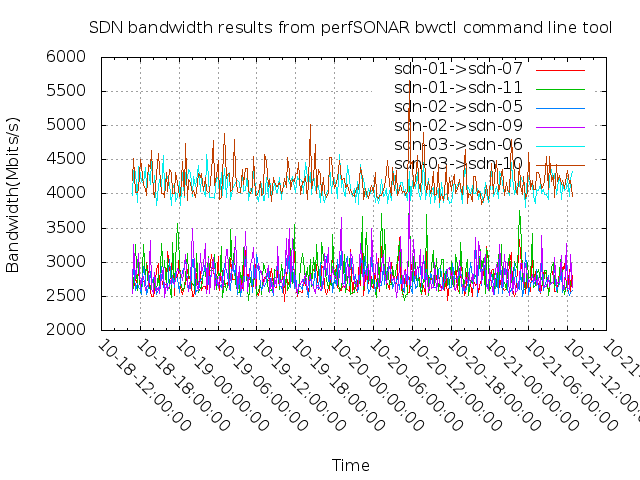
For the perfSONAR bandwidth tests run Jianan from 10/28/13 to 10/31/13 – I have calculated the following averages and standard deviations.  I separated the results at a 5 Gbps (5000Mbps) level – results above 5000 are considered non-overlapping and results below 5000 are considered overlapping.

There are some surprising results – it appears there are a some cases where two hops is faster (on average) than one hop – but other results show that two hops is slower.  Spreadsheet with data is here: SDN perfSONAR Rates #2

SDN01->SDN07 (1) SDN01->SDN11 (1) SDN01->SDN07 (2) SDN01->SDN11 (2) Notes
Averages 2739.5 2817.2 8999.5 7771.6 SDN01->SDN07 – One Hop
Std Dev 176.2 255.0 116.4 274.2 SDN01->SDN11 – Two Hops
SDN02->SDN05 (1) SDN02->SDN09 (1) SDN02->SDN05 (2) SDN02->SDN09 (2)
Average 2734.3 2835.7 7967.7 7685.8 SDN02->SDN05 – One Hop
Std Dev 165.4 252.8 280.1 315.5 SDN02->SDN09 – Two Hops
SDN03->SDN06 (1) SDN03->SDN10 (1) SDN03->SDN06 (2) SDN03->SDN10 (2)
Average 4147.2 4184.7 7910.8 8406.4 SDN03->SDN06 – One Hop
Std Dev 188.1 211.7 224.8 432.1 SDN03->SDN10 – Two Hops
SDN05->SDN01 (1) SDN05->SDN09 (1) SDN05->SDN01 (2) SDN05->SDN09 (2)
Average 2937.5 3019.3 9056.3 9041.7 SDN05->SDN01 – One Hop
Std Dev 182.2 249.6 103.9 106.6 SDN05->SDN09 – One Hop
SDN06->SDN02 (1) SDN06->SDN10 (1) SDN06->SDN02 (2) SDN06->SDN10 (2)
Average 3022.1 3170.1 9005.1 8978.1 SDN06->SDN02 – One Hop
Std Dev 272.9 388.8 121.1 347.2 SDN06->SDN10 – One Hop
SDN07->SDN03 (1) SDN07->SDN11 (1) SDN07->SDN03 (2) SDN07->SDN11 (2)
Average 3682.3 3758.3 8733.7 8705.8 SDN07->SDN03 – One Hop
Std. Dev. 187.1 226.8 125.1 114.4 SDN07->SDN11 – One Hop
SDN09->SDN03 (1) SDN09->SDN07 (1) SDN09->SDN03 (2) SDN09->SDN07 (2)
Average 2754.4 2873.9 9073.2 7870.8 SDN09->SDN03 – Two Hops, One borderline result >5000Mbps
Std. Dev. 174.6 307.0 125.2 294.1 SDN09->SDN07 – One Hop
SDN10->SDN01 (1) SDN10->SDN05 (1) SDN10->SDN01 (2) SDN10->SDN05 (2)
Average 2708.0 2843.4 8119.0 7584.9 SDN10->SDN01 – Two Hops
Std. Dev. 175.4 280.0 339.7 336.5 SDN10->SDN05 – One Hop
SDN11->SDN02 (1) SDN11->SDN06 (1) SDN11->SDN02 (2) SDN11->SDN06 (2)
Average 4163.5 4160.7 8006.4 8740.1 SDN11->SDN02 – Two Hops
Std. Dev. 196.7 232.8 234.7 131.6 SDN11->SDN06 – One Hop
Units Mbps
SDNXX->SDNYY (1) – Denotes a result of <5000 Mbps – Overlapping Test
SDNXX->SDNYY (2) – Denotes a result of >5000 Mbps – Non Overlapping Test

Mininet, Pox, and Generating Flows per Second

Development for testing Layer2 flows per second was successful! The goals were the following:

  • get a controller to generate X number of flows (currently L2 flows) to see how many flows a switch could handle
  • 2nd, get a controller to generate X number of flows per second

Both were successful thanks to mininet. http://mininet.org/

Mininet creates virtual hosts, controllers, and switches in an instant. This was developed by people that wanted create a tool to help with openflow/SDN development.

It was pretty easy to get setup by just following their directions on their website. Once I downloaded the mininet VM, installed it… it was up and running.

The entire testing setup consisted:

  • a Mininet VM, which had an openflow switch and two hosts
  • a POX openflow controller on my local machine

All I had to do to get mininet to connect to the controller on my local machine was to point it to my actual network interface that go me outside of my machine on to our production network.

sudo mn --controller=remote,ip=10.180.0.207,port=6633

I tried from mininet to have it use my loopback address and the nat’d gateway address, but neither worked until I used my local computers prodcuction network NIC.

Once I did that, mininet connected to my machines POX controller…

INFO:openflow.of_01:[00-00-00-00-00-01 1] connected
DEBUG:forwarding.ryan_l2:Switch 00-00-00-00-00-01 has come up.

Here is the code that is used for Flows per second testing…

http://sites.duke.edu/dukesdn/2013/11/06/pox-l2-flow-generator-code/ 

The default for the code is 100 flows total, 10 per second. This can be changed by edit a couple of the numbers commented in the code.

In mininet, in order to see the flows you type the following…

mininet> dpctl dump-flows
*** s1 ------------------------------------------------------------------------
NXST_FLOW reply (xid=0x4):
 cookie=0x0, duration=31.849s, table=0, n_packets=0, n_bytes=0, idle_age=31, dl_dst=01:23:45:d6:52:a3 actions=output:2
 cookie=0x0, duration=34.973s, table=0, n_packets=0, n_bytes=0, idle_age=34, dl_dst=01:23:45:98:8d:f4 actions=output:2
 cookie=0x0, duration=33.935s, table=0, n_packets=0, n_bytes=0, idle_age=33, dl_dst=01:23:45:2f:8d:55 actions=output:4
 cookie=0x0, duration=36.006s, table=0, n_packets=0, n_bytes=0, idle_age=36, dl_dst=01:23:45:d5:1a:2e actions=output:4
 cookie=0x0, duration=32.899s, table=0, n_packets=0, n_bytes=0, idle_age=32, dl_dst=01:23:45:db:89:8d actions=output:4

Since each line is a flow (except the first line) we can just use the wc (word count) command to see the number…

The output will be:

# of lines, # of words, and # of characters

mininet> dpctl dump-flows | wc
*** s1 ------------------------------------------------------------------------
 101 803 12107

So we have 101 lines, or 100 flows.

POX L2 Flow Generator Code module

from pox.core import core

from pox.lib.util import dpid_to_str

import pox.openflow.libopenflow_01 as of

import pox.lib.packet as pkt

from pox.lib.addresses import IPAddr, EthAddr

from random import randrange

from pox.lib.recoco import Timer


log = core.getLogger()

flows = 0 #flows counts the number of flows we want there in the end it’s defined as a global VAR


class testFlows (object):

def __init__ (self):

core.openflow.addListeners(self)


def _handle_ConnectionUp (self, event): # as soon as a switch starts up we’re going to start writing random flows to it

log.debug(“Switch %s has come up.”, dpid_to_str(event.dpid))

def pushflows():

global flows

if flows < 100: #Change this number to the maximum number of flows you want installed

print “starting timer in 1secs” #you can take or leave this one… just a test

for x in range(0, 10): # set the number of rules that you want per second to the second number in the range

macaddress = ’01:23:45:’+hex(randrange(16,255))[2:]+’:’+hex(randrange(16,255))[2:]+’:’+hex(randrange(16,255))[2:] # create a random mac. random number 16-255 and then convert to hex

port = randrange(2,5) # assign to random port in a range

msg = of.ofp_flow_mod()

#msg.priority = 32768 # set priority

msg.match.dl_dst = EthAddr(macaddress) # match our random mac address to a destination port

msg.actions.append(of.ofp_action_output(port = port)) # set destination port

event.connection.send(msg) # send our flow out

log.debug(“installing flow for destination of %s” % (macaddress)) # log it

flows = flows + 1

Timer(1, pushflows, recurring = True)  #timer is set to 1 second

def launch ():

core.registerNew(testFlows) # startup and run class

perfSONAR Test Results – 10/28/13 to 10/31/13

Jianan Wang ran a series of perfSONAR runs that included runs that overlapped their timing and runs that were done with no overlap.

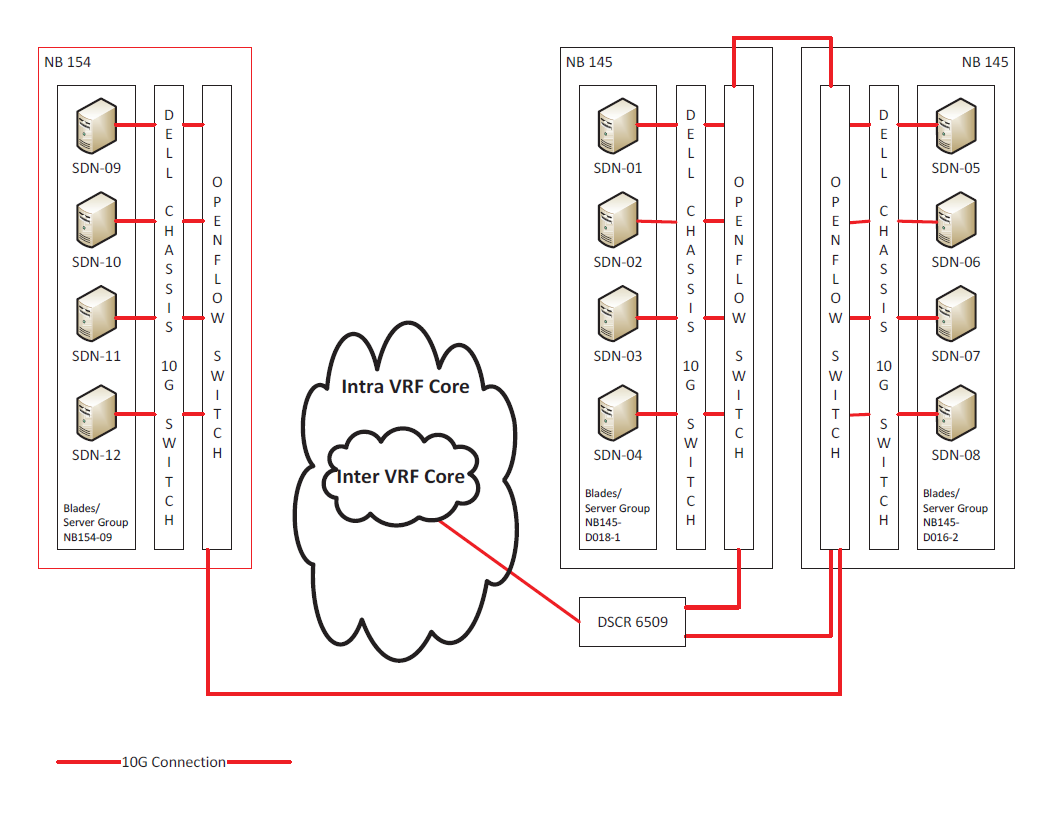
The three blade chassis, each containing four blade servers, are connected to three independent OpenFlow switches.

Connections between blades SDN09/SDN10/SDN11/SDN12 to SDN05/SDN06/SDN07/SDN08 traverse two OpenFlow switches

Connections between blades SDN09/SDN10/SDN11/SDN12 to SDN01/SDN02/SDN03/SDN04 traverse three OpenFlow switches

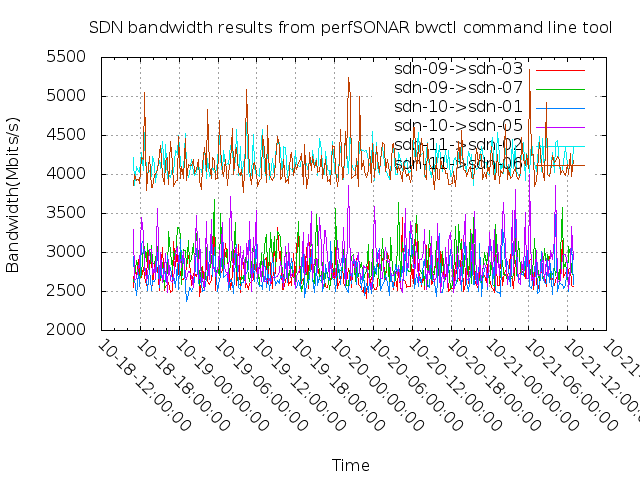
As expected, the runs with no overlap showed approximately 9 Gbps of available bandwidth for traffic that ran through two switches, while the runs that overlapped (across three servers) showed approximately 3 Gbps of available bandwidth

A reduction of 1 Gbps was seen in traffic that flowed across the additional switch for the unblocked test.

SDN09 Rates

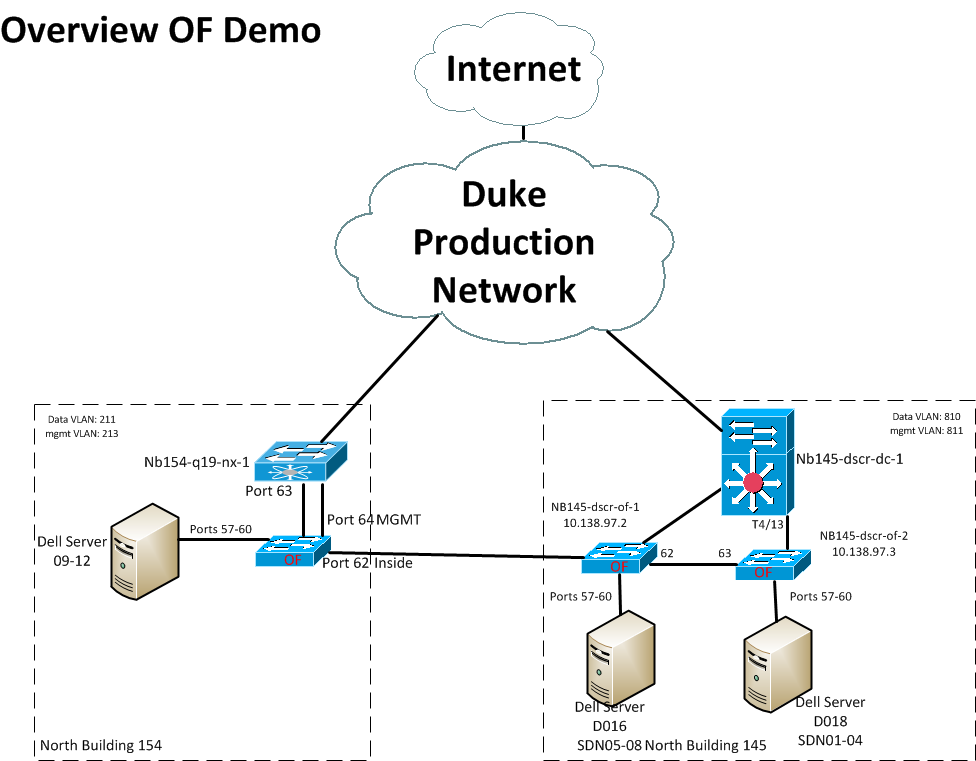
As a reminder, here is an overview of the server topology

SDN Topology Image

Here is a shorter time window that shows the variation between blocking and non-blocking perfSONAR tests (note that this is for SDN10 connections to SDN01 and SDN05).

SDN10 Rates