This guide discusses a feature that is available to all Dropbox Professional customers.
If you’re a Dropbox Professional customer, the feature is available by default. If you’re a Dropbox Business team admin, you can enable Smart Sync and get started.
Smart Sync is a Dropbox feature that helps you save space on your hard drive. Access every file and folder in your Dropbox account from your computer, using virtually no hard drive space. Smart Sync is available for Dropbox Professional customers, and members of Dropbox Business teams. With Smart Sync, you can:
- Choose if individual files or folders are available online-only or locally on your computer
- Select a default sync setting for new files and folders that are shared with you
With Smart Sync, content on your computer is available as either online-only, local, or in mixed state folders.
 Online-only content
Online-only content appears in the Dropbox folder on your computer, but doesn’t use the full amount of space that the file otherwise would. You can see the file, but the content isn’t fully downloaded until you need it. Only information about the file, such as the file name, location, and date the file was updated, is downloaded.
 Local content
Local content is downloaded and saved on the hard drive of your computer. You can directly edit these files from applications on your computer. This content is still backed up to Dropbox as well.
 Mixed state folders
Mixed state folders contain both local and online-only content.
Start with Smart Sync
When you start using Smart Sync:
- There’s no change to files already in the Dropbox folder on your computer
- New content is automatically online-only unless you or your team admin chooses otherwise
Note: To use Smart Sync, you need to install the Dropbox desktop application on your computer.
Why Smart Sync?
Smart Sync is a reliable way of using cloud-based storage to maximize efficiency by minimizing the amount of storage used by project data on individual users’ PCs and Laptops. As projects get larger, networks get faster, and hard drive space becomes more of a valuable commodity, Smart Sync allows users to choose which files are stored locally and which files are stored in the cloud.
Mac Instructions:
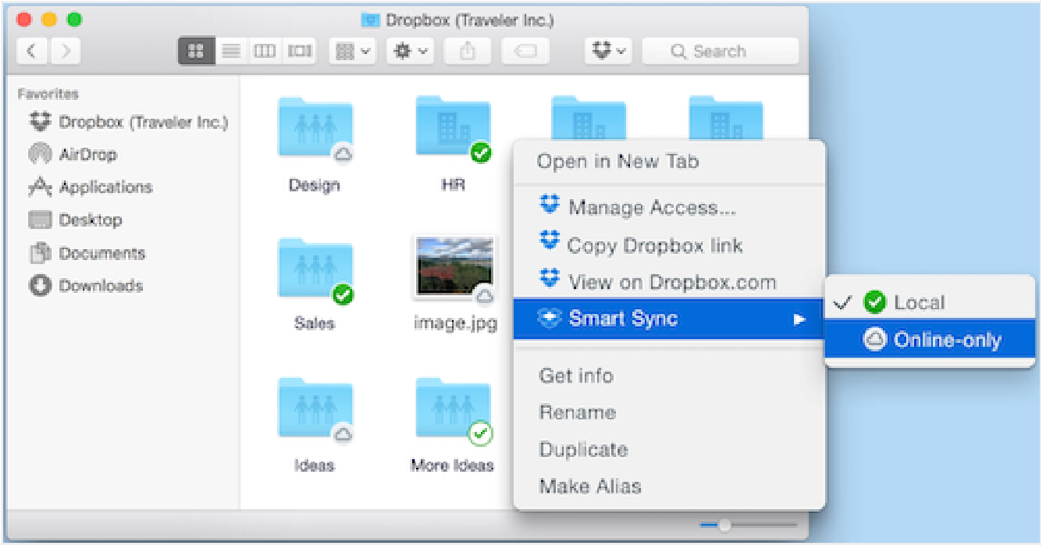
How do I make content online-only?
- Open the Dropbox folder on your computer.
- Click the Dropbox icon from the menu bar.
- Click the folder icon.
- Choose Open folder.
- Locate the content that you want to make online-only.
- Control-click or right-click the file or folder.
- Choose Smart sync.
Choose Online-only
How do I sync online-only content to my computer?
You can open a file as usual through your application or Finder. Dropbox downloads the entire file to your computer.
To sync a file or folder without opening it immediately, you can make it local:
- Open the Dropbox folder on your computer.
- Click the Dropbox icon from the menu bar.
- Click the folder icon.
- Choose Open folder.
- Locate the content that you want to make online-only.
- Control-click or right-click the file or folder.
- Choose Smart sync.
- Choose Local.
How can I choose a default setting for new content?
- Click the Dropbox icon from the menu bar.
- Click the gear icon and select .. from the menu.
- Click Sync.
- Choose your work Dropbox account.
- Change the selection for Smart Sync Default:
- Admin default: the default setting chosen by your team admin.
- Local: all new content downloads to your computer.
- Online-only: manually download files to your computer.
Windows Instructions:
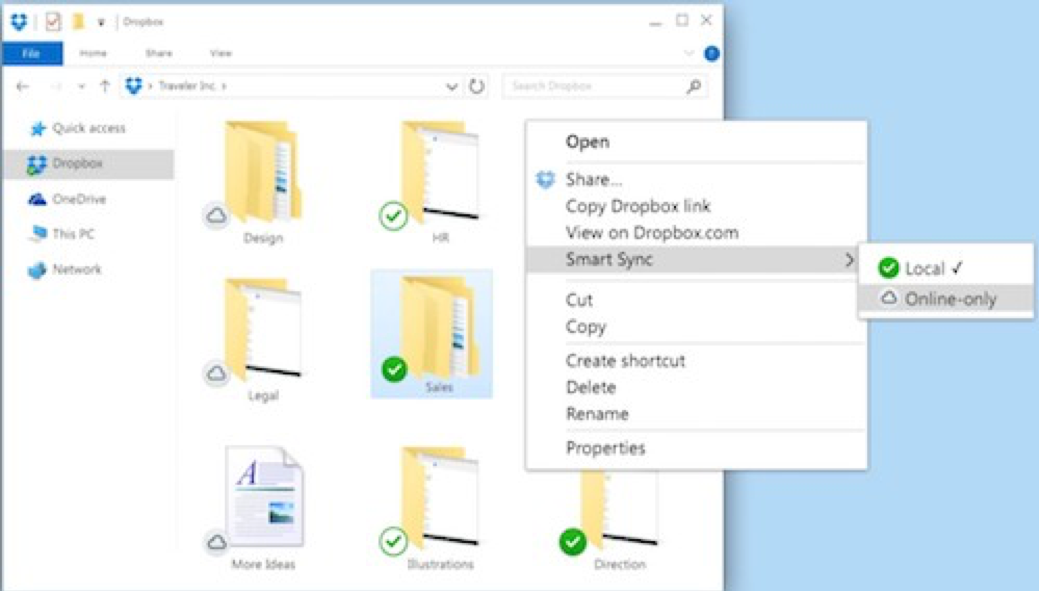
How do I make content online-only?
- Open the Dropbox folder on your computer.
- Click the Dropbox icon from the system tray.
- Click the folder icon.
- Choose Open folder.
- Locate the content that you want to make online-only.
- Right-click the file or folder.
- Choose Smart sync.
Choose Online-only.
How do I sync online-only content to my computer?
You can open a file as usual through your application or Windows Explorer. Dropbox downloads the entire file to your computer.
To sync a file or folder without opening it immediately, you can make it local:
- Open the Dropbox folder on your computer.
- Click the Dropbox icon from the system tray.
- Click the folder icon.
- Choose Open folder.
- Locate the content that you want to make online-only.
- Right-click the file or folder.
- Choose Smart sync.
- Choose Local.
How can I choose a default setting for new content?
- Click the Dropbox icon from the system tray.
- Click the gear icon and select .. from the menu.
- Click Sync.
- Choose your work Dropbox account.
- Change the selection for Smart Sync Default:
- Admin default: the default setting chosen by your team admin.
- Local: all new content downloads to your computer.
- Online–only: Manually download files to your computer when you need them.
Frequently Asked Questions
What are the system requirements for Smart Sync?
Smart Sync works on Microsoft Windows Vista and above, and on Mac OSX 10.9 and above.
I have folders selectively synced, how do I make my selective sync content online-only?
Follow the steps to change the selective sync settings for your folders. Once your folders are no longer selectively synced, they automatically become online- only folders.
Does changing a file to online-only delete the file from my Dropbox?
No, making a file online-only doesn’t delete it from your Dropbox. When you make a file online-only, the file content will be deleted from your computer, but the full file will still be available in your account online and on your other devices.
Do online-only files use space on my local hard drive?
Online-only files use a small amount of space on your hard drive to store information about the file, such as its name and size. This uses less space than the full file.
Can I access online-only content when I’m not connected to the internet?
No, online-only content isn’t stored locally on your computer. Connect to the internet to access online-only content.
Can I move online-only files within my Dropbox folder?
Yes, you can move online-only content inside the Dropbox folder on your device, and changes sync to your other devices. If you move online-only content outside of the local Dropbox folder, the content downloads to that location.
What happens if I delete an online-only file or move it to my trash?
Any actions taken on an online-only file sync to your Dropbox account and to anyone else who shares that file. Since the file isn’t stored on your computer, the file content will not be available in your trash. You can restore deleted files from your Dropbox account online.
Can I use my desktop search to find online-only files or their contents?
You can use your desktop search to locate online-only files and folders by name. However, online-only files don’t contain the full contents of your file, so your desktop search can’t search file contents.
Can I have different Smart Sync settings on different devices?
Yes, Smart Sync settings are unique to each device you link to your Dropbox account.
Can I have local files in an online-only folder?
Yes, if a folder is online-only, you can download individual files inside the folder.
Can I remove content from my device completely without removing it from my Dropbox?
Yes, if you don’t want files to appear on your device, you can use selective sync. Selective sync helps you choose which files appear in your desktop application, and which are only available online.
Can I use Smart Sync on my personal account?
Smart Sync is available for all Dropbox Professional customers. It’s also available as an early access feature for Dropbox Business users. If you connected a personal account (Basic or Plus) to a Business account, Smart Sync won’t be available for that personal account
Note: All information in this guide from: https://www.dropbox.com/help/desktop-web/smart-sync.
Please go here for any additional information.